

Volvo Dashboard Warning Lights is your machine telling you, “Something is wrong—act now.” This guide helps off-road machinery owners understand common Volvo dashboard symbols fast, using the simple color system (red / amber / green-blue) so you can choose the safest next step.
Steps for Any Warning Light
Safety comes first, even before troubleshooting. Move the machine to a safe place and reduce risk before you start checking anything.
- Stop the machine in a safe area. Select flat ground and avoid areas near traffic, edges, and soft shoulders.
- Lower the attachment to the ground. This prevents sudden movement if the power drops.
- Set the parking brake and idle briefly if safe. A short cool-down helps after heavy work (unless a red light tells you to shut down).
- Read the message on the display. Many Volvo machines show a short text note with the symbol.
Clear statement: “If you are not sure what the light means, stop and check—guessing can break expensive parts.”
What do the Volvo Dashboard Colors Mean?
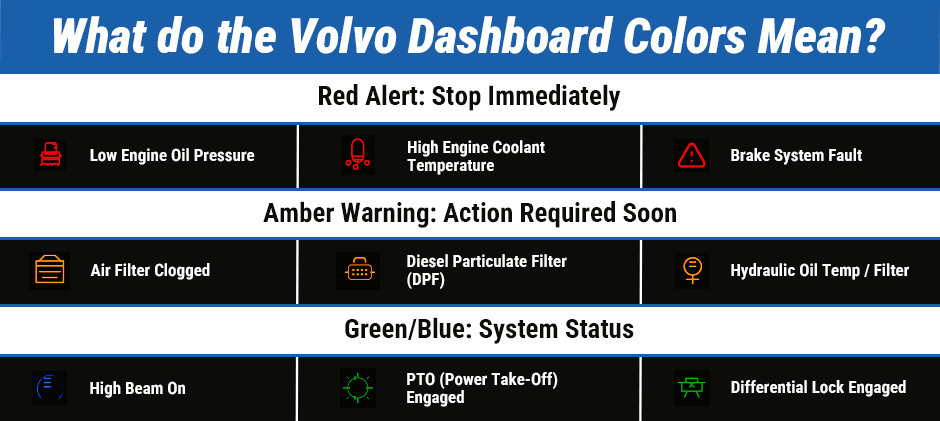
Color tells you how urgent the problem is. Volvo uses a simple hierarchy so you can react quickly.
- Red = Stop now. Critical fault or safety risk.
- Amber/Orange = Service soon. Not always an emergency, but you should fix it quickly.
- Green/Blue = Information. A system is on or active.
Quote to remember: “Color is a fast hint, but the symbol and message are the final answer.”
Red Symbols: Stop Immediately
A red symbol means stop work immediately. Continuing to run can destroy the engine, hydraulics, or brakes.
Engine Oil Pressure
Low oil pressure can destroy the engine in minutes. Shut down as soon as you can do it safely.
- Stop work and shut the engine off.
- Let it sit, then check the oil level.
- If the oil level is normal, do not restart. The issue could be the oil pump, a blocked passage, wiring, or the sensor.
Clear statement: “Red oil pressure = shut down now.”
Engine Coolant Temperature
Overheating can ruin the engine. Shut down and let the engine cool fully.
- Stop work and shut down.
- Wait until it cools before opening caps or checking levels.
- Check for low coolant, leaks, blocked radiator fins, or a fan/belt problem.
Brake System Fault
Brake faults are a safety problem first. Do not keep operating if stopping power may be reduced.
Park safely and do not continue the job.
Check the display message and call maintenance/technician.
Amber Symbols: Service Soon
Amber lights mean “fix soon” to prevent a bigger failure later. You can often finish a short, safe task, but you should plan service quickly.
Clogged Air Filter
A clogged air filter makes the engine weak and wastes fuel. Dusty job sites cause this often.
- Expect lower power and higher fuel use.
- Clean or replace the filter soon, based on your service schedule and site conditions.
DPF (Diesel Particulate Filter)
The DPF light means the exhaust filter is full of soot. The machine may need regeneration to clean it.
- If the light is steady, follow your machine’s regen instructions.
- If the light is flashing or combined with other warnings, you may need diagnostics.
- A fault code check can help you confirm the cause (for example, using a Volvo fault code list).
Clear statement: “DPF warnings are easier to fix early than after derate or shutdown.”
Hydraulic System Warnings
Hot hydraulic oil or a clogged filter can damage the pump. Reduce heavy hydraulic work and plan service.
- If oil is overheating, check for blocked coolers and poor airflow.
- If a filter is restricted, expect slow or weak hydraulics and extra strain on components.
Green & Blue Symbols: System Status
Green and blue lights usually mean a function is active. These are “status” lights, not faults.
Common examples include:
- High beam indicator (blue/green): High beams are on.
- PTO engaged (green): PTO is active (on models equipped).
- Differential lock (green): Diff lock is engaged for traction.
10-Second to Fix the Volvo Dashboard Warning Lights
Use this simple rule to choose your next step.
- Red: Stop safely → shut down → read message → check basics → call service
- Amber: Reduce load → finish only safe, short work → schedule service soon
- Green/Blue: Normal status → no repair action needed
Quote: “Red is about preventing damage today. Amber is about preventing downtime tomorrow.”
How to Prevent Volvo Dashboard Warning Lights
Good daily checks prevent most surprise warnings. Small habits can save major repair time.
- Check engine oil, coolant, and visible leaks each shift.
- Blow out coolers/radiator area when working in dust and chaff.
- Follow service intervals for filters (air, fuel, hydraulic).
- Record repeated lights so a tech can spot patterns.
If a warning points to a failed sensor, filter, or hydraulic component, replacing the correct part quickly matters. Many fleets keep common wear items on hand, and sourcing reliable aftermarket Volvo parts can help reduce downtime when you need a replacement fast.
Frequently Asked Questions
What if the symbol color and meaning don’t match?
Some lights are “special cases.” For example, some amber icons can be informational depending on the system and whether the light is flashing or steady. Always follow the symbol + message text on the display, then confirm in the operator’s manual for your exact model.
Can I keep working with an amber light?
Sometimes yes, but keep it short and safe. Avoid heavy loads, long travel, and high heat until the issue is fixed.
What if I don’t know the symbol?
Stop and verify before you guess. Take a photo of the symbol and message, then share it with your shop or dealer for accurate help.
Summary
Dashboard symbols are a simple language: red means stop, amber means fix soon, and green/blue means status. If you react early, you can avoid bigger damage and keep your Volvo machine working safely. When you’re ready to replace a sensor, filter, or hydraulic item, you can browse FridayParts for compatible aftermarket Volvo parts to get your equipment back on the job with less downtime.
