

A blinking LED or an unfamiliar error message on a scissor lift brings work to a halt — but in most cases, the machine is telling you exactly what’s wrong. This guide to Skyjack fault codes breaks down every flash pattern and display message so you can trace the fault in minutes rather than losing the afternoon to guesswork. Inside you’ll find the flash code format explained step by step, module-by-module charts covering the GP102, GP106, and GP108 controllers, the numeric SKYCODED faults on newer machines, and the Deutz engine signals found on boom lifts — plus the quick field checks worth running before any part gets ordered.
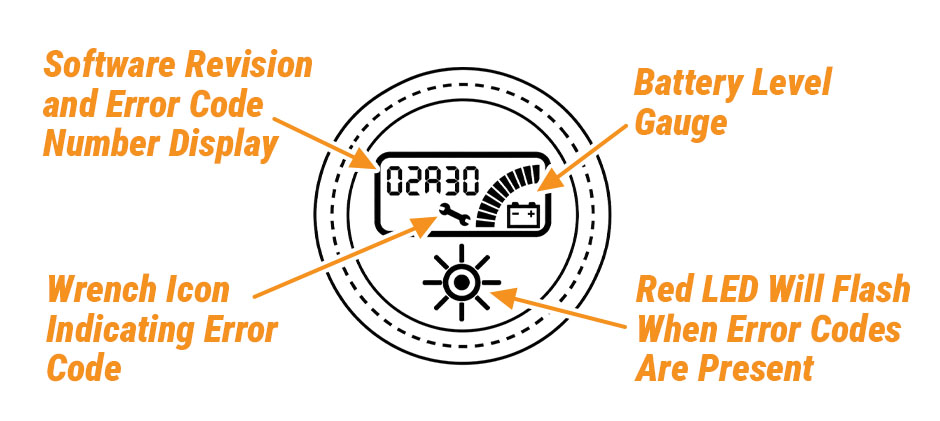
Decoding Skyjack Flash Codes
Every code in this Skyjack fault codes list follows the same X/Y structure. The LED on the control module fires a burst of quick flashes, pauses briefly, then fires a second burst. A longer pause closes the sequence before it starts over.
- First digit: quarter-second flashes separated by quarter-second gaps
- Mid pause: roughly 1.5 seconds
- Second digit: another run of quarter-second flashes
- End pause: about 4 seconds, then the cycle repeats
So 1/2 means one flash, a pause, then two flashes, followed by the long pause. Before matching anything to a chart, though, confirm which module the LED belongs to. On earlier electric scissors, the GP102 manages lift and drive. The GP106 controls auto-leveling outriggers on rough-terrain models. The GP108 handles lift and drive on newer ANSI-compliant machines. Because an identical flash sequence maps to different faults on different modules, identifying the module is always the first move.
If you intend to clear calibration faults or investigate further, an EZcal diagnostic tool belongs in the kit. It connects straight to the module and surfaces live data that an LED alone can’t communicate.
GP102 and GP108 Fault Chart
These two controllers oversee lift and drive on most SJIII units and the newer A-series scissors. The codes in this Skyjack fault codes list below are the ones that show up most often in the field.
| Code | Meaning | First Thing to Check |
|---|---|---|
| 1/1 | Vehicle tilted | Move to level ground |
| 1/2 | Platform overloaded | Reduce load weight |
| 1/4 | Drive cut out, platform too high | Lower platform to drive height |
| 1/5 | Lift function blocked | Platform already at max height |
| 2/1 | Elevation switch out of position | Inspect switch alignment |
| 2/2 | Elevation switch stuck | Free or replace the switch |
| 4/1 | Short to 0V at P4-1 or P5-1 | Examine harness and pins |
| 5/1 | Low B+ supply | Load-test the battery pack |
| 5/2 | EMS input fault | Verify emergency stop wiring |
| 5/4 | Up and down active together | Check joystick micro-switches |
| 5/6 | Drive and lift inputs faulty | Inspect joystick harness |
| 6/1 | Height not calibrated | Run EZcal calibration |
| 6/2 | Load not calibrated | Run EZcal calibration |
| 6/5 | Invalid height signal | Test height transducer at P4-3 |
| 7/7 | Startup message | Normal — clears by itself |
| 7/8 | Self-test running | Normal — clears by itself |
Codes 7/7 and 7/8 aren’t failures at all. They’re boot indicators that disappear once the module completes its handshake. If either lingers beyond a few seconds, look at supply voltage or a stalled software state instead.
A stubborn 5/1 almost never means a dead controller — it points to a tired battery bank or corroded terminals. Before spending money on a module, load-test the pack and clean every connection along the main cable run. Fresh scissor lift batteries and properly torqued battery cable terminals clear this code far more often than any electronic repair does.
GP106 Outrigger Faults
Rough-terrain scissors with self-leveling legs rely on the GP106 module. The flash format is identical to the GP102 and GP108, but every meaning changes.
- 1/1: Vehicle tilted beyond tolerance
- 1/2: Outriggers locked out because the platform is raised
- 2/1: Legs deployed but machine still not level
- 2/2: Outriggers not in the home position
- 5/1: Low battery supply
- 5/2: Supply fault at pin P4-9
- 5/5: Release the outrigger demand input
- 6/6: Manual outrigger control active
- 7/1: Faulty tilt sensor
- 7/5: Slave microprocessor fault
- 7/6: Hardware fail-safe stalled
When 7/1 appears after a rough transport, check the tilt sensor mount before ordering parts. The assembly may have shifted in its bracket — loosen it, re-level with a digital gauge, and retighten.
The 8/x family on this module flags specific stuck or shorted input pins. Match the exact code against the manual for your serial number range, since pin assignments were revised across production runs.
SKYCODED Numeric Faults
Newer electric scissors replace the flashing LED with a numeric display and keypad. These entries in the Skyjack fault codes list are considerably easier to read at a glance. The system is called SKYCODED, and its codes are considerably easier to read at a glance.
| Code | Display Message | Meaning |
|---|---|---|
| 111 | PINPAD! | PIN entry required for access |
| 112 | EVERYTHING OK | Normal running state |
| 137 | LOW BATTERY | Voltage sagging under lift demand |
Code 137 is the one that appears constantly — and the one most likely to mislead you. It triggers when pack voltage dips under load, not at rest, so a voltmeter reading taken on a parked machine can look perfectly healthy while the fault is very real.
Work through these steps in order:
- Cycle the master disconnect to reset the main contactor
- Load-test each battery individually
- Inspect battery tray cables and lugs for corrosion
- Examine main contactor contacts for pitting
- Trace the SKYCODED module harness for chafing
When the batteries themselves test strong, but 137 keeps returning, a quality main contactor assembly or a fresh battery interconnect cable set usually puts an end to it.
Deutz Engine Faults on Boom Lifts
Skyjack boom lifts and telehandlers powered by Deutz 2.2L or 2.9L engines communicate through the SAE J1939 protocol. These engine codes sit outside the main Skyjack fault codes list, but they matter just as much on boom lift models. Every fault carries two identifiers: an SPN that identifies the system involved, and an FMI that describes the nature of the failure.
Two routes exist for pulling these codes:
- Diagnostic switch: hold the switch until the warning lamp flashes out a three-digit short code
- SerDia software: connect a laptop running Deutz SerDia for the complete SPN and FMI readout
One code worth knowing in advance:
| Code | SPN / FMI | Likely Cause |
|---|---|---|
| P1070 | SPN 598 / FMI 10 | Clutch signal rate of change — frequently follows an ECU software update |
Depending on build date, the engine ECU will be an EMR4 or the later EMR5, and code behavior differs slightly between them. Match the serial plate to the correct Deutz manual before chasing any signal. A clean fuel filter and a healthy engine wiring harness eliminate the most common false alarms long before the ECU becomes a suspect.
Field Checks Before Ordering Parts
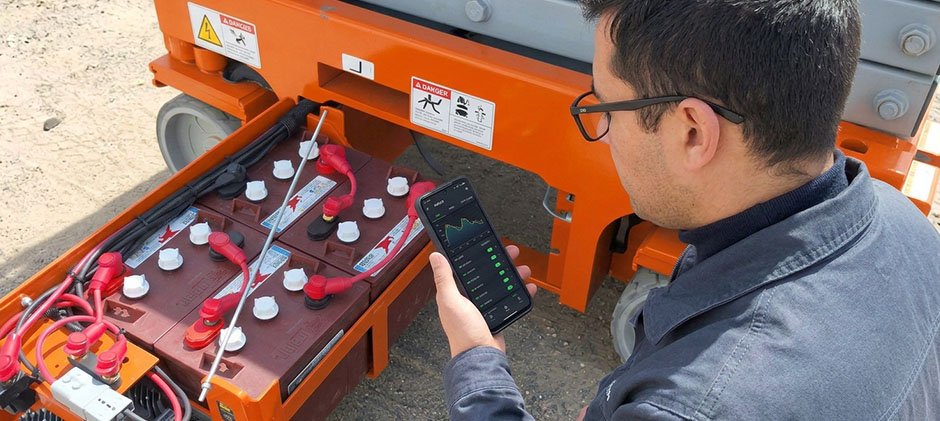
A surprising share of fault codes originate from simple mechanical or electrical issues rather than failed electronics. Whenever a code appears, run through this list first:
- Battery voltage under load: a pack reading 24 V at rest can collapse to 20 V the instant the pump motor engages
- Harness condition: inspect for chafed insulation around pivot points, hinges, and the scissor stack
- Pin tightness: a loose Deutsch pin imitates both shorts and open circuits
- Ground connections: one corroded chassis ground can throw codes on circuits that seem completely unrelated
- Switch alignment: elevation switches get knocked out of position by hard landings and transport
Fleet operators should keep replacement proximity switches, joystick controllers, and limit switch assemblies on the shelf — between them, these three components account for the majority of input-side faults on scissor lifts.
One last caution: any code referencing calibration — 6/1, 6/2, 6/3 — will not clear on its own or through a reset. Clearing it properly requires the EZcal tool and, for load calibration, a certified test weight. Attempting shortcuts here only burns shop time.
Final Thoughts
A working knowledge of Skyjack fault codes replaces guesswork with a straight line from symptom to cause. Figure out the module, match the code, run the field checks — then and only then start ordering parts. When replacements are due, FridayParts keeps a deep stock of aftermarket components for Skyjack scissors, booms, and telehandlers: controllers, sensors, battery cables, Deutz filters — all at prices that keep fleet repairs affordable and your machines earning instead of sitting.
