

Do you prefer SAE controls or ISO controls? In this guide, we’ll break down the key differences between ISO vs SAE controls and how you can operate your excavator safely.
Excavator Control Patterns: ISO vs SAE
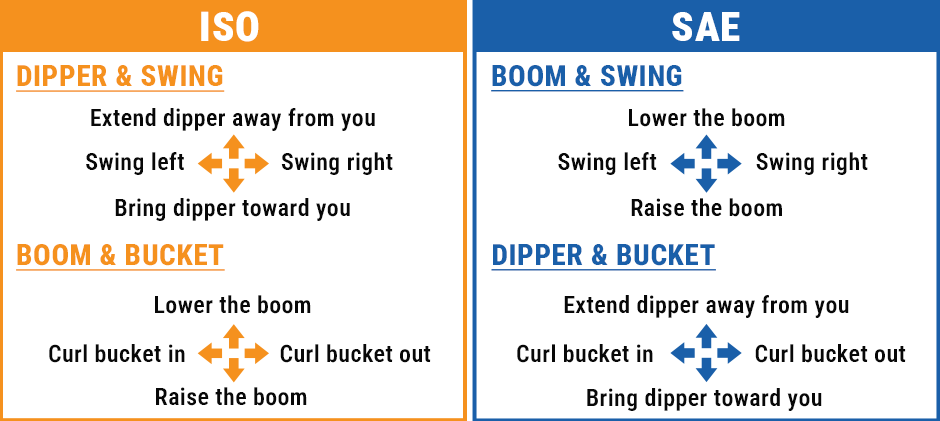
No matter what size excavator you’re using, the controls will operate the same. There are two main excavator control patterns: ISO and SAE. They share the same basic movements: swing, boom, stick and bucket. And the key difference lies in how these movements are split between your left and right hands.
What Is ISO Controls?
The ISO controls-aka CAT or Excavator controls- arrange movements to mirror your natural arm motion.
ISO Left Joystick Actions (dipper and swing)
- Pull back: Bring the stick closer, like pulling something toward you
- Push forward: Extend the stick away, like reaching for something
- Move left/right: Swing the upper structure in that direction
ISO Right Joystick Actions (boom and bucket)
- Pull back: Raise the boom (lift the arm up)
- Push forward: Lower the boom (bring the arm down)
- Move left: Curl bucket in, like scooping
- Move right: Dump bucket, like pouring
What Is SAE Controls?
SAE controls–aka Deere or Backhoe controls- are the opposite way of operating an excavator to ISO controls. They split the movement between hands in a way that made sense for early backhoe operators who needed to coordinate with front loader controls.
SAE Left Joystick Actions (boom and swing)
- Pull back: Raise the boom (lift arm up)
- Push forward: Lower the boom (bring arm down)
- Move left/right: Swing the upper structure in that direction
SAE Right Joystick Actions (dipper and bucket)
- Pull back: Bring the stick closer
- Push forward: Extend the stick away
- Move left: Curl bucket in
- Move right: Dump bucket
Why Excavator Controls Matter?
The choice of ISO vs SAE controls depends on personal preference and it can also impact your work efficiency and productivity. Here’s why:
Muscle Memory & Fatigue
- ISO controls mimic natural arm movements → less mental effort required
- Your brain doesn’t need to “translate” desired movements into inputs
- Less mental strain = less fatigue during long shifts
Multi-Function Operations
- Experienced operators combine multiple movements simultaneously
- Example: raising the boom while curling the bucket at the same time
- ISO makes these combined movements feel more intuitive and natural
ISO vs SAE: Which Is Better?
The right choice depends on your background and the equipment you most commonly operate.
Choose ISO if:
- You primarily operate excavators
- You prefer controls that mimic natural arm movements
- You want to reduce mental fatigue on long shifts
Choose SAE if:
- You frequently switch between backhoes and excavators
- You trained on SAE equipment and have built muscle memory around it
- Your jobsite primarily uses John Deere machinery
The most important factor is consistency. Switching between patterns mid-job or without proper adjustment can lead to operating errors and safety risks. Stick with whichever pattern you are most comfortable with, and always re-familiarize yourself when switching to a different control mode.
Bottom line: The best control pattern is the one you know best — master one before switching to the other.
How to Operate an Excavator Safely?
Before you enter the excavator, make sure the door is secure and locked to the side of the machine. Use the handle to climb in safely while making three points of contact. Once you are in the cab, follow these steps:
- Fasten your seat belt first
- Release the door lock and close the door
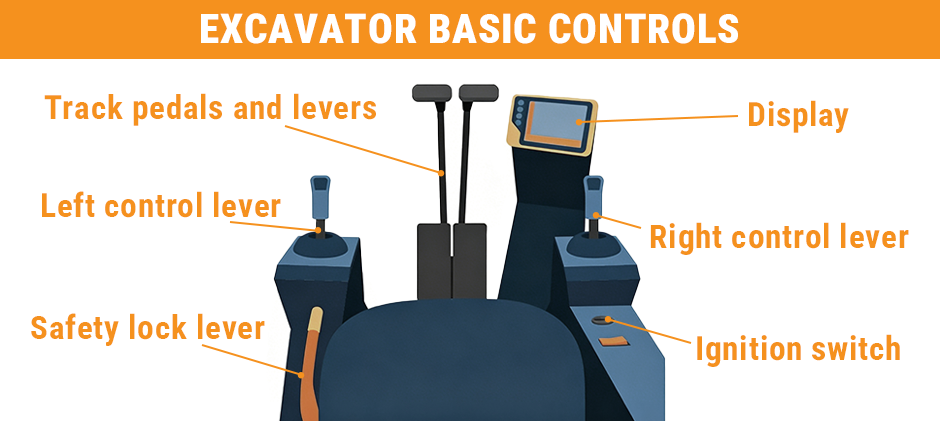
- Make sure you’re familiar with the controls
See full guides on How to Use Excavator Joysticks here.
Excavator Safety Tips
Whether you plan to operate a mini-excavator or another type of excavator, you should follow best safety practices to prevent accidents.
Conduct a Pre-Operation Safety Check
A pre-operation check is essential for individual safety and can also prolong the life of your machine. Your safety inspection should include the following:
- Check the surrounding area for hazards
- Walk around the machine and ensure all parts are free from damage
- Check under the machine for damage or leaks
- Check the tracks for tension and loose/missing parts.
- Check the boom and bucket.
- Check fuel, fluid levels, and filters.
- Test the lights and controls.
Be Aware of Your Surroundings
This practice includes:
- Always monitor the area around you — watch for other equipment and workers
- Check for overhead and underground utility lines before driving or digging
- For best visibility: keep bucket horizontal, 1–2 feet off the ground
- In low-clearance areas: lower the dipper and curl the bucket in
Maintain Your Equipment
- Always consult the operator manual before use — it covers parts, controls, and safety features
- Follow the manual’s maintenance guidelines to keep equipment in top condition
- Use caution with older equipment if its maintenance history is unknown
Are Backhoe and Excavator Controls the Same?
While many modern backhoes and excavators support both SAE and ISO control patterns, the two machines are not operated the same way. Historically, backhoes ran on SAE and excavators on ISO — but even when they share the same joystick pattern today, their overall controls differ. Controls also vary by manufacturer and machine model. Additionally, because a backhoe features a front loader and wheels rather than tracks, its driving pedals and controls are fundamentally different from those of a standard excavator.
Wrapping up
Understanding the excavator controls doesn’t have to be so complicated. It’s as simple as the first time you learned to drive, from overwhelming at first to eventually automatic. The excavator controls work the same way. They come in two different joystick patterns: ISO vs SAE. Once you grasp the basic movements, operating them becomes second nature. At FridayParts, you can source a vast selection of high-quality excavator joystick controller replacements for your CAT, John Deere and other brands. Explore our selection and enjoy your smooth operation.
